Product comparison

HubSpot Nurture Agent vs. Singulate

HubSpot’s Nurture Agent uses AI to rewrite published automated emails from CRM data and web research.

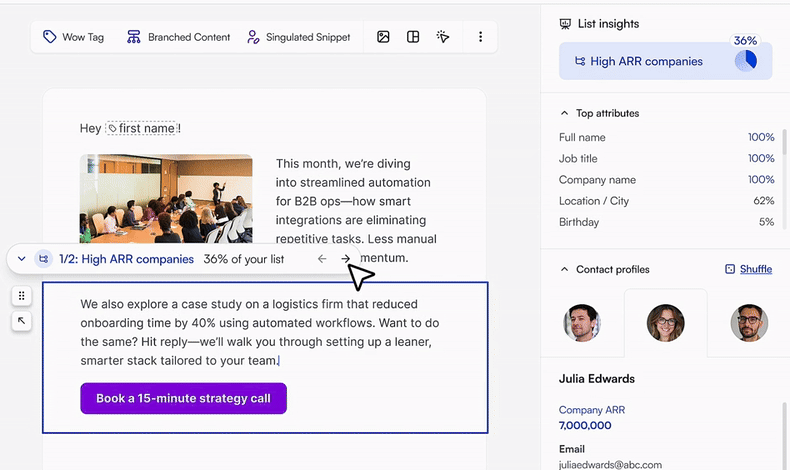
Singulate gives marketers a way to build personalization directly into their emails, from audience-specific content to individualized snippets, across one-off campaigns and workflows.

Here’s where the tools differ.
Where Singulate gives you more control

HubSpot’s Nurture Agent personalizes emails you’ve already published. Singulate lets you build personalization into the email itself, from different messages for different audiences to details written for each person.

One-off campaigns and workflows
HubSpot Nurture Agent

Automated emails only. One-off campaigns aren’t supported.

Singulate

Personalize one-off campaigns and automated workflows.

Different messages for different audiences
HubSpot Nurture Agent

No audience branching. The agent rewrites each contact’s email on its own.

Singulate

Create distinct audience branches within an email, with audience counts and example contacts to check your targeting.

Making messy CRM data usable
HubSpot Nurture Agent

Uses CRM values as stored, messy or not.

Singulate

Wow Tags clean and reformat field values so they read naturally in your copy.

Combining types of personalization
HubSpot Nurture Agent

One approach: AI rewrites of the email text.

Singulate

Combine Branched Content, Wow Tags, and individualized Singulated Snippets within one template.

Control over the message
HubSpot Nurture Agent

Pick data sources and lock modules, but no writing instructions or direct edits.

Singulate

Write audience-specific sections, configure snippet writing instructions, set fallbacks, and preview recipient-specific output.

Outside Nurture Agent, HubSpot’s smart content and lists can also vary email content by audience.

Explore the full comparison ↓

Full feature comparison

A closer look at campaign support, segmentation, data, writing controls, testing, and costs.

Last reviewed October 23, 2026

Building and editing
Directing the personalization
HubSpot Nurture AgentNo prompt. Data sources and locks only.Pick the properties, objects and activities the agent can read, lock modules it should leave alone, and turn on brand voice. There’s no place to tell it what to write. The agent decides.
SingulateYou direct every section.Decide section by section: a branch per audience, a Singulated Snippet with your own writing instructions, a Wow Tag, or copy that stays exactly as written.
Editing the output
HubSpot Nurture AgentCan’t edit the generated copy.If a version reads wrong, your only lever is changing the data sources or locks and regenerating the preview.
SingulateEdit the instructions and the copy.Change writing instructions, branch copy and fallback text directly, then check the new output in preview.
Working with an agent
HubSpot Nurture AgentNo chat, no drafting help.Nurture Agent runs at send time on an email you’ve already written. It doesn’t help you draft or revise the email.
SingulateThe Singulate Agent.Chat with the Singulate Agent to draft the email and set up its personalization, then refine either one in the editor.
Rollout control
HubSpot Nurture AgentA percentage, not an audience.A slider sets the share of recipients who get an AI version, 50% by default. Everyone else gets the original, and you don’t choose who’s in which group.
SingulateYou choose who gets what.Each branch goes to the audience you defined. Turn on Allow empty to leave a section out for an audience rather than send them generic copy.
Data and review
Data inputs and research
HubSpot Nurture AgentCRM data and web research.Nurture Agent uses the contact properties, other objects and activity types you select, plus web research.
SingulateCRM fields and source material.Use any synced HubSpot property, paste reports, transcripts or event lists into a Singulated Snippet as source material, and add research on each contact on plans that include it.
Data visibility
HubSpot Nurture AgentValues hidden.You see which properties and activities are selected, but not the values the agent is reading for the contact you’re previewing.
SingulateSee your data before you write.List Insights shows how complete each field is, and each branch shows its share of the list and example contacts.
Verifying each contact
HubSpot Nurture AgentHover to see why.Hover over highlighted text to see the agent’s reasoning. The contact’s field values aren’t shown, so bad data is hard to spot before it goes out.
SingulateExample contacts and sample output.Branches show example contacts in each audience and Wow Tags show sample results, so bad data shows up before any email is generated.
Data cleanup
HubSpot Nurture AgentMessy data goes in as is.Nurture Agent has no step for cleaning field values. In our test, the greeting used the stored name unchanged (“Hey J. Marlow,”).
SingulateWow Tags fix messy fields.Describe the change in plain language, such as “company name without Inc.”, check sample previews and set fallback text. The CRM record stays as it is. For changes a Wow Tag can’t make, a Singulated Snippet can write the phrase instead.
Reviewing output at scale
HubSpot Nurture AgentNo rules for what it writes.Brand voice, locks and the recipient percentage limit where changes happen and for how many people, but not what the agent says.
SingulateInstructions, fallbacks and previews.Writing instructions constrain what each Singulated Snippet writes, and fallback text covers contacts without enough data. Generated copy can still miss, so preview a range of contacts before you send.
Previewing before you send
HubSpot Nurture Agent10 contacts at a time.Three recently enrolled contacts are preselected, and you can preview up to 10 at a time. Beyond those, you see a contact’s version only after it’s sent.
SingulateAny contact on the list.Search the list and preview any contact’s version of the whole email. Once the email is in HubSpot, previews only work for contacts it was generated for.
What changes in the email
What gets personalized
HubSpot Nurture AgentText only.The agent rewrites the subject, preview text, body and CTA text. Images, layout and blocks stay the same for everyone.
SingulateCopy, blocks, images and CTAs.Singulated Snippets write individual statements, and Branched Content can swap any block per audience, images and CTAs included.
Email length
HubSpot Nurture AgentEmails get longer.The agent adds and swaps phrases. In our tests, every personalized email came out longer than the original.
SingulateCan make an email shorter.Branched Content can replace or skip whole blocks per audience, and a Singulated Snippet can skip its fallback, so some readers get a shorter email.
Removing content for some readers
HubSpot Nurture AgentCan’t drop a block for some readers.Locks stop the agent rewriting a module, nothing more. In our test, a stray internal note stayed in the email.
SingulateSkip a block per audience.Remove a block for everyone, or branch it so one audience gets different copy or none at all.
Campaigns, testing and cost
Email types
HubSpot Nurture AgentAutomated emails only.Only published, non-transactional automated emails. In our test, the option was disabled on a one-off marketing email, so newsletters and announcements are out.
SingulateCampaigns and workflows.Personalize one-off HubSpot marketing emails and Send with Singulate steps in HubSpot workflows. The setup differs for each.
Testing
HubSpot Nurture AgentA built-in split.The recipient percentage doubles as the test: everyone else gets the original, and the performance report compares the two.
SingulateA/B tests in a HubSpot workflow.A random-split branch in a HubSpot workflow sends your base email against the personalized one. HubSpot’s workflow Test feature skips Singulate’s generate step, so test by enrolling yourself instead.
Measurement and reporting
HubSpot Nurture AgentPersonalized vs. original.The Nurture Agent performance report compares deliveries, open rate, click rate and click-through rate for both versions. You can see the version a contact received for 30 days after the send.
SingulateHubSpot reports plus Singulate Analytics.Sends report in HubSpot as usual. Singulate Analytics adds engagement by branch, and personalized vs. fallback results for each Singulated Snippet.
Cost
HubSpot Nurture Agent10 HubSpot Credits per email.Each personalized email sent to a contact uses 10 credits, per HubSpot’s product catalog (checked October 23, 2026). Previews are free. What you spend depends on the credits your plan includes, any capacity you buy and your billing terms. When credits run out, contacts get the original email until the next month.*
SingulateSingulate Enterprise.The HubSpot integration is part of Singulate Enterprise, from $2,000 a month with onboarding and a named contact. Contact research is billed separately, in credits. We price your volume on a demo.

*HubSpot list prices as of October 2026: Marketing Hub Professional includes 3,000 credits a month and Enterprise 5,000, and extra capacity is $10 per 1,000 credits. At those prices, personalizing 50,000 emails a month uses 500,000 credits, about $4,970 a month beyond Professional’s included credits, or about half that at HubSpot’s default of 50% of recipients. Nurture Agent requires Marketing Hub Professional or Enterprise.

HubSpot’s built-in personalization tools

Tokens, smart content and lists, without Nurture Agent.

Personalization tokens
HubSpot, built inMerge fields with defaults.Insert a contact or company property, with a default for empty values. The value appears exactly as stored.
SingulateWow Tags.Insert the same properties reshaped into natural phrasing, with fallback text when a value is missing.
Dynamic content
HubSpot, built inSmart content rules.Show different versions of a module by rules such as list membership or lifecycle stage, set up one module at a time.
SingulateAudiences from a description.Describe each audience in plain language, and Singulate generates the segment with its share of the list and example contacts.
Segmentation
HubSpot, built inLists and properties.Build active or static lists from contact data, then use them for sends and smart content rules.
SingulateSegments inside the email.Create as many audiences as a section needs, down to a single block, without building another HubSpot list.
Seeing your data while you write
HubSpot, built inA property and a default.Insert properties from the personalization token menu, with a default value for contacts where the field is empty.
SingulateCoverage in the editor.List Insights shows how complete each field is, the share of the list in each segment, and example contacts, beside the email you’re writing.
Messy values
HubSpot, built inShown as stored.A token prints the property exactly as stored, so an awkward value has to be fixed on the record before it reads well in an email.
SingulateReshaped for the email.A Wow Tag reshapes the value for the email only, with sample previews and fallback text, and leaves the CRM record as it is.
One-to-one content
HubSpot, built inThrough Nurture Agent.Tokens and smart content choose between versions you write. Writing for each contact is what Nurture Agent adds, compared above.
SingulateSingulated Snippets.Turn general content into takeaways, examples and recommendations for each person, from your writing instructions, with a fallback.
Combining methods
HubSpot, built inOne rule per module.Smart content and tokens can sit in the same email, each working on its own.
SingulateStacked.Put a Singulated Snippet inside a branch to write something individual for each person in that audience.
Click-through results
HubSpot, built inYour own results.HubSpot reports opens and clicks for every send, so you can compare the versions you build yourself.
Singulate74% higher click-through rate.Across enterprise customers’ sends, personalized versions earned a 3.71% click-through rate against 2.13% for generic versions of the same email.
See the Nurture Agent screenshots ↓

So which should you use?

It comes down to whether you want AI to personalize an automated email you’ve already built, or you want to decide how the content changes for different audiences and individuals.

HubSpot Nurture Agent

Choose Nurture Agent if…

You only send automated emails, you’re comfortable letting AI decide what to rewrite, and you’d rather not add another platform.

Expect less control. You choose the data sources and lock modules, but you can’t direct what the agent writes, and every personalized email uses HubSpot credits.

Singulate

Choose Singulate if…

You want more control over how personalized emails are built.

Maybe you want one version of an offer for decision-makers and another for practitioners. Maybe your CRM data needs cleaning before it belongs in a sentence. Or maybe you want each recipient to get a specific recommendation based on their role or interests.

With Singulate, you can combine those approaches within the same email, then send through HubSpot.

See Singulate with HubSpot →

A closer look at HubSpot’s Nurture Agent

These screenshots show how HubSpot handles personalization settings, email previews, eligibility, and credits.

Setup and inputs

How HubSpot introduces Nurture Agent

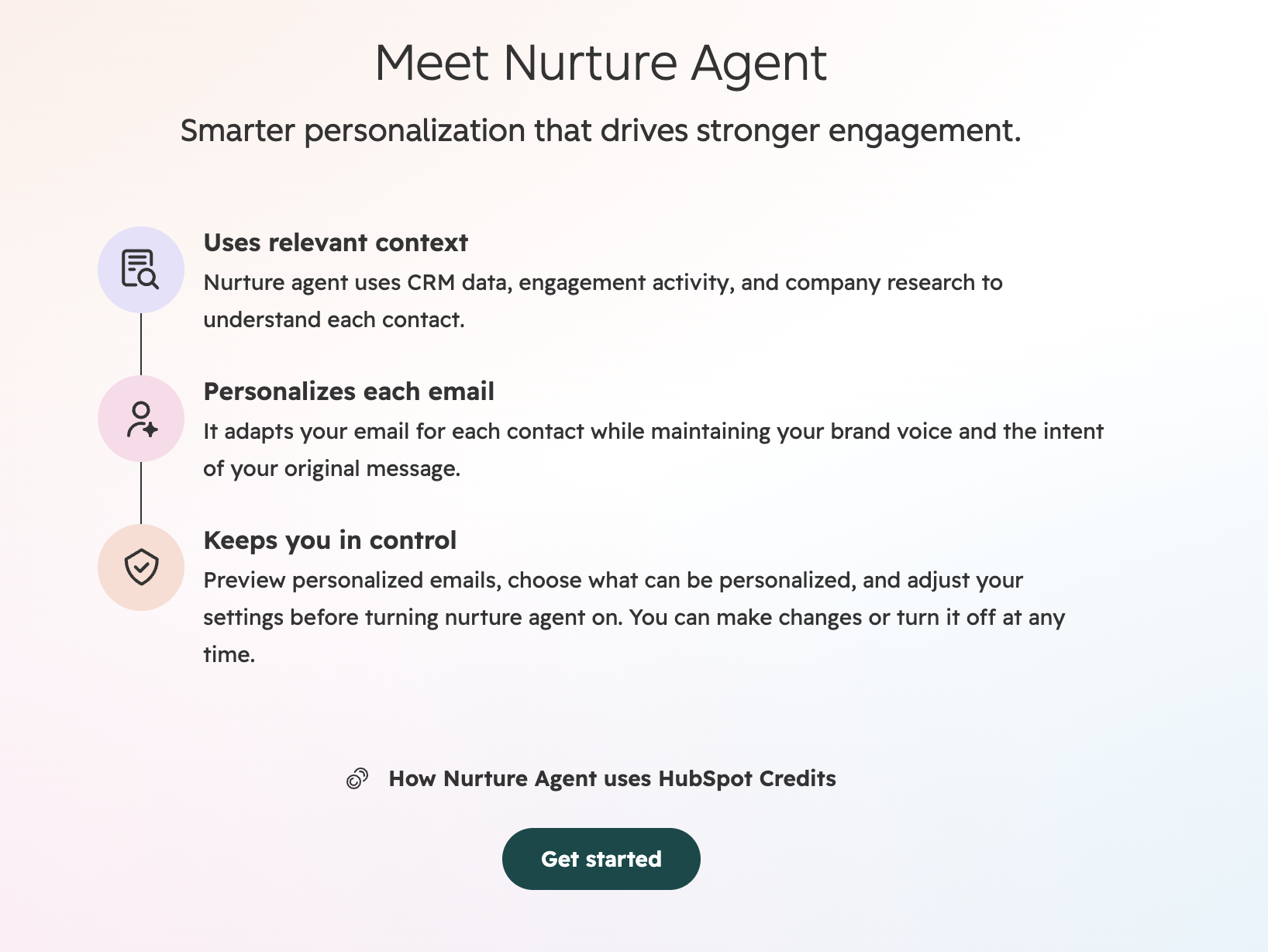
HubSpot’s intro screen: the agent uses relevant context to personalize each email while keeping the intent of the original message.

Selecting data sources

Choose which properties and activities Nurture Agent can use, then regenerate the preview. Here the greeting uses the stored name as is (“Hey J. Marlow,”), and a stray “Linkedin... investor...” note stays in.

Generating a preview

Nurture Agent fetches the contact’s properties while the preview generates. The values aren’t shown next to the email.

Reviewing generated copy

Personalized view

Each change is highlighted in green. All five here are additions, such as “and congrats on the recent ORVA acquisition.”

Compare view

Removed text is struck through in red and added text is highlighted in green. In this follow-up, each change replaces a phrase with a longer one.

Previews and eligibility

Preview limit

Three recently enrolled contacts are preselected, and you can preview up to 10 contacts.

Not available on one-off emails

On a one-off marketing email, the Personalize with nurture agent button is disabled, and the tooltip says it’s only for automated emails.

Credits

Credits per email

Nurture Agent uses 10 HubSpot Credits for each personalized email.

Included credits

Marketing Hub Professional includes 3,000 credits a month and Enterprise 5,000, enough for about 300 and 500 personalized emails. Nurture Agent isn’t available on Starter.

Additional credits

Additional capacity costs $10 per 1,000 credits, enough for 100 personalized emails.

Questions before adding Singulate to HubSpot?

Nurture Agent rewrites automated emails with AI. You choose the data it reads, but you can’t tell it what to write.

Singulate gives you more control over how that personalization is built. You can write different content for different audiences, clean up CRM data as you write, and create individualized snippets within those messages.

You also get that approach for supported one-off campaigns, not only automated workflows.

Yes. You can keep the parts you’ve already written and personalize only the sections that benefit from it.

For example, you might keep your introduction and CTA the same, change the middle paragraph for different personas, and add a recommendation tailored to each recipient.

You control the writing instructions and can review recipient-specific versions before publishing.

No. Branched Content lets you create different versions of an email section for different audiences within the same template.

You can check how contacts are assigned to those branches and review the resulting emails before publishing to a supported HubSpot workflow.

There is integration setup involved, but you don’t need to duplicate an entire workflow just to vary a paragraph by audience.

Yes. You can personalize one-off campaigns as well as supported HubSpot workflows.

That’s particularly useful for newsletters, event invitations, product announcements, re-engagement campaigns, and other emails that don’t belong in a long-running automation.

That’s common.

Wow Tags can help format and clean specific CRM field values before they’re used in your copy. For Singulated Snippets, you can set fallback text or leave a section out when there isn’t enough information to personalize it well.

You can preview the results before publishing.

Yes. You can set up A/B tests using the HubSpot integration to compare a base email against a personalized Singulate version.

HubSpot can continue handling the sends and reporting, so you can evaluate actual campaign performance rather than relying only on how the emails look.

See what your HubSpot emails could look like with Singulate.

Bring a campaign you’re already working on. We’ll show you how Singulate can tailor the message for different audiences and individual contacts, using the data you already have.

Explore the HubSpot integration →